 AI Video Community

AI VIDEO COMMUNITY
Make AI video that looks real.
Learn AI images, video, voice, music and editing step by step, from your first image to UGC ads, social content and short films people can't tell are AI.
Join the waitlistCancel anytime


350,000+ in our AI video groups
WHO IT'S FOR
No experience needed. Just the right path.
Whether you've never opened an AI tool or you've been experimenting for months, the course takes you from where you are to video people can't tell is AI.
Complete beginners
Never made an AI image? Start Here takes you from zero to your first realistic image and clip, one step at a time.
Content creators
Make Reels, TikToks and Shorts that stop the scroll, without filming every shot yourself.
Side hustlers
Learn one of the most in-demand creative skills right now, at your own pace, around your day job.
Freelancers and agencies
Add realistic AI ads, product visuals and UGC-style content to what you can make.
Founders and marketers
Make your own product videos, ads and social content in-house, without a film crew.
Storytellers and filmmakers
Build scenes, music visuals and short films you could never shoot on a normal budget.
MADE WITH AI
Can you tell?
Look at the light, the skin, the movement. Every clip here was made with AI, using the methods inside the course.


HOW IT WORKS
Learn it. Make it. Post it.
Learn it
Short, focused video lessons, each with a downloadable lesson guide and copy-ready prompts.
Make it
Every Stage ends with one real project, so you build your skills by making something, not just watching.
Post it
Share your work in the community, get feedback, and move to the next Stage.
WHAT CHANGES
From scrolling past AI video to making it.
Before
- Dozens of AI tools and no idea which to use
- AI clips that look plastic and obviously fake
- Characters whose faces change from shot to shot
- Hours spent on prompts for so-so results
- Learning alone from scattered tutorials
After
- A short stack you actually know how to use
- Images and clips people can't tell are AI
- Consistent characters across images and video
- Copy-ready prompts and workflows that get you close on the first try
- A community that gives feedback on every project
From idea to clip
What you'll make

Short films
Build a scene from believable shots and cut it together.

UGC ads
Make creator-style ads with the feel of a phone camera.

AI influencers and avatars
Build a recognizable character across different clips.

Social content
Make short clips that feel at home in a feed.

Faceless channels
Tell a story through hands, objects and point of view.

Music visuals
Give a track its own visual world.

Product visuals
Make the details of a product do the talking.
THE CURRICULUM · NINE STAGES
Your path.
Self-paced and updated every week as new tools and techniques arrive.
Start Here
Find your way around, set up your tools and make your first AI image in your first session.
Foundations
How AI images, video, voice and music fit together, and how to write prompts that get you what you picture.
AI Images
Realistic people, products and scenes: the lighting, framing, skin and texture that pass for real photos.
AI Video
Turn your images into clips with believable motion and camera moves, then add voice, music and sound.
AI Ads & UGC
Phone-native UGC ads, product demos and influencer-style content that feels at home in the feed.
AI Skills & Workflows
Build reusable workflows in ChatGPT, Claude and Gemini that handle the repetitive parts for you.
Social Media Growth
The formats, hooks and posting plans that help your AI content get seen.
AI Filmmaking
Plan and build a short film scene: story, shot list, generation and edit.
Clone Yourself
Create a realistic digital version of yourself and your voice for talking videos.
Lesson preview
Open a lesson
Watch a rooftop portrait edit in progress. The lesson guide breaks the edit into steps you can follow with your own image.

What's included
- Step-by-step video lessons across nine Stages
- A downloadable lesson guide for every video lesson
- Copy-ready prompt vaults for images, video and UGC ads
- A project at the end of every Stage, with community feedback
- A private community of members making AI video
- Weekly AI tool updates and new lessons
MEET YOUR INSTRUCTOR
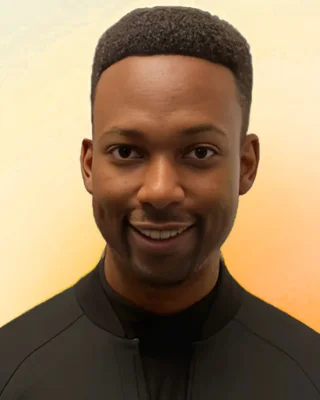
About David
David Brooks is a storyteller and digital marketer with more than 10 years of experience creating content and growing audiences online. He has produced video for advertising agencies, ad campaigns and viral social content.
Along the way, he built the world's largest AI video network: more than 350,000 people across his AI video groups, plus 25,000+ newsletter subscribers who follow his weekly roundup of new tools.
AI Video Community is everything he's learned, organized into one step-by-step path, so you can go from your first AI image to video people can't tell is AI.
- 350,000+group members
- 25,000+newsletter subscribers
- 10+ years in content and video
Membership
Choose your plan
Monthly
$9 / month
Billed monthly · Cancel anytime
Annual Best value
$55 / year
Billed annually · about $4.58/month
Good to know
FAQ
I've never made an AI image. Is this for me?
Yes. Start Here walks you from your first image to your first video, one step at a time.
Do I need to be an artist, editor or filmmaker?
No. If you can describe what you want in a sentence, you can write a prompt. The course shows you the rest.
Which tools do I need, and what do they cost?
Most have free credits to start. The course shows you which one tool to begin with and when an upgrade is worth it.
Do I need a powerful computer?
No. The main tools run in your browser, so a regular laptop works.
Are the lessons live or recorded?
Recorded and self-paced, so you can learn whenever it suits you. New lessons are added every week.
How much time does it take?
As much as you want to give it. Each lesson is short, and every Stage ends with one project to post.
How long do I have access?
For as long as your membership is active, including every new lesson.
How do I cancel?
Anytime from your Skool settings, in a couple of clicks.
How is this different from the free Facebook groups?
The groups show what's possible. The course teaches how, step by step, with lesson guides, prompts and feedback on your work.


